VII. Transitioning from the BioNavigator desktop app
If you have worked in the BioNavigator desktop app, you might want to redo your experiment with the new apps in the Tercen-based BioNavigator.
There are two ways to redo your experiments in Tercen:
- Directly upload the experiment zips to Tercen and start from Image Analysis --> we suggest this if you have only a few experiments.
- Export S100 - if you have many runs and you have already integrated them in a BioNavigator Data Analysis workflow, it is better to export it after the ETS step to skip Image Analysis.
Exporting S100 from BioNavigator desktop app
1. Export data from the .bn6 workflow.
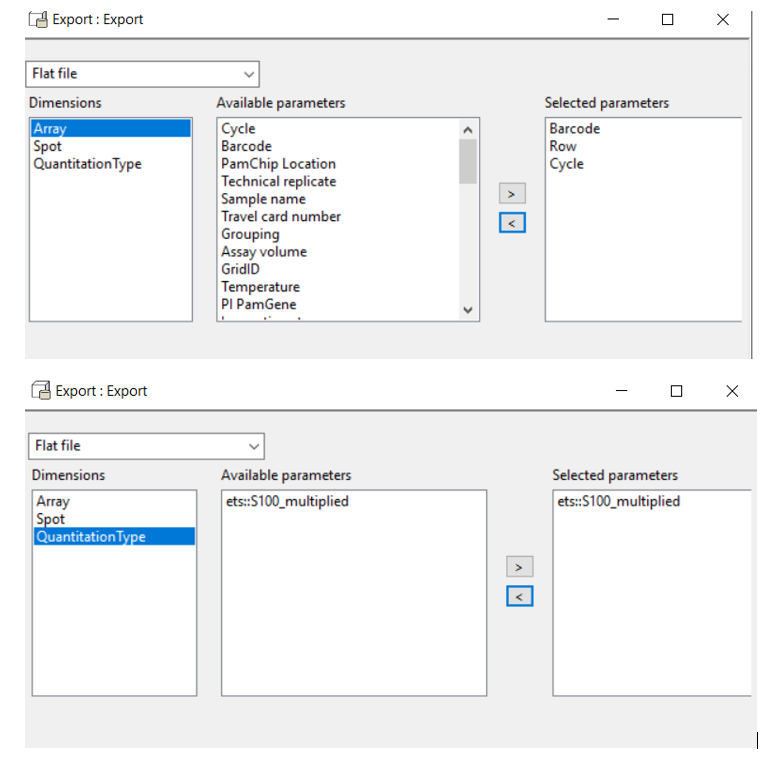
After ETS, add export step
- Export type: Flat file
- From array, export: Barcode, Row, Cycle
- From Spot, export: ID
- From QuantitationType, export:ets::S100_multiplied
2. Change the data headers to match Tercen format
Open this output in notepad or Notepad++ (not in Excel).
Delete the first row which is not part of the actual data.
Change the name of factors:
- ets::S100_multiplied --> ETS.ds1.S100
- Cycle --> ETS.ds1..Cycle
- ID --> ETS.ds1.ID
- Barcode --> ds0.Barcode
- Row --> ds0.Row
Sample annotation / enrichment:
There are two sample annotation columns that are pre-selected in the Tercen templates: Test Condition and Supergroup. If you have different annotations, this will lead to "Missing factor" errors which is expected and you can fix them in the data analysis workflow (see later). However, changing the name of your annotation columns to the above 2 (exact column names) before uploading the annotation will solve this problem.
3. Upload the data and the sample annotation (enrichment) in your Tercen project:
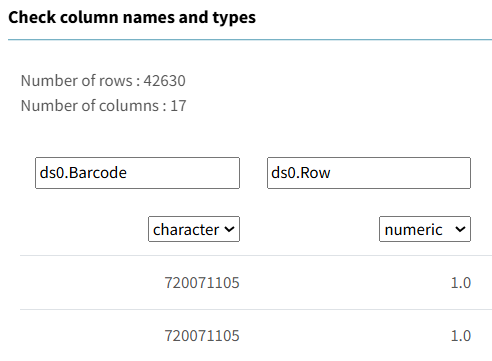
Import data --> Delimited text --> change Barcode to character, Row should remain numeric, and check whether all column types are correct
4. In a new data analysis template:
Make a workflow from the PTK_template or STK_template.
-
Upload your exported data and your enrichment into the data steps and join them. Joining is done on Barcode and Row, but the factor names can be a little different between the two files, e.g. ds0.Barcode or Barcode. Select the correct factors.
-
Delete the ETS step and join this directly to the QC step. Run the QC.
-
From the next normalization step (Log or VSN) probably you will get "Missing factor" errors, because some factors (e.g.
Test Condition) are pre-selected with slightly different factor names that you have in your data. To fix the error, you must change all these factors to the one that you have in your data/sample annotation. The pre-selected factors are not only in the crosstab, but also in the Filters and sometimes in the colors!
Comparing desktop-BioNavigator UKA to new (cs)UKA
First make sure that the two analyses were done in the same way:
- normalization (log, VSN, ComBat)
- outlier removal
- STK QC app (instead of the LOD-version, add the old version in Tercen only for comparison purposes)
- QC app threshold (e.g. 0.25%)
When the two analyses were done in the same way, then the remaining differences between UKA files only stem from the differences in the UKA algorithm and UKA database.
Comparing the latest desktop-BioNavigator UKA version (2022) to the Tercen-based UKA_app with version 0.2.x:
Make sure you run the new app with same parameters as the 2022-version: - without the Kinase Library (KL) - without removing dual-specificity kinases
Compare the UniprotIDs, and not Kinase_Name - Kinase_Name changed to primary gene names after moving to Tercen.
The differences then stem from new version of the UKAdb, the kinase-to-peptide database the UKA algorithm uses. PamDx releases an updated UKAdb and UKA_app version approximately once per year to:
- adapt changes from UniProt.
- fix potential bugs
- add new data (e.g. Kinase Library)
- add new features (e.g. removal of dual-specificity kinases, or the automated comparison of all conditions versus each other)
For the complete list of differences, see the UKA_app readme.
Comparing to the confidence-scoring, csUKA_app:
Additional to the database change, the csUKA_app has updated algorithm. Read about the differences what this can bring in PamDx methods / Kinase Analysis.